 Kosken
Modes: audit, shadow and live
What Kosken may do on a machine in each mode, what lowers the effective mode, and how to move a machine up.
On this page
After this guide you know what each mode lets Kosken do on a machine, and you can change the mode of a machine.
Change the mode of a machine
You need write access.
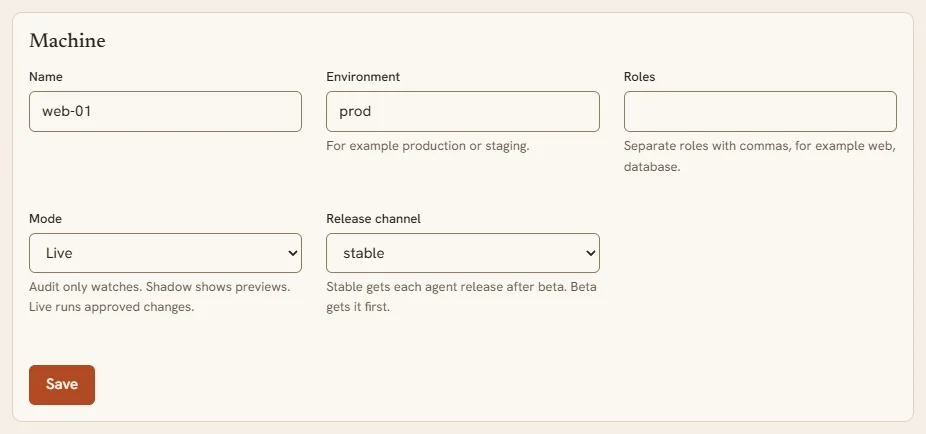
- Open Machines and click the name of the machine, for example
web-01. - Click the Settings tab.
- In the Machine card, choose a Mode: Audit, Shadow or Live.
- Click Save.
The audit log records each change of mode. Each machine starts in audit mode. Move it to shadow, then to live, when you trust what you saw.
What each mode does
| Mode | What Kosken does |
|---|---|
| Audit | Reads and reports. It opens incidents, runs read-only checks and writes the cause. It changes nothing. The report says which recipe it would run in shadow or live mode. |
| Shadow | Shows what Kosken would do. It proposes a recipe, and a person decides on each proposal. A preview (the dry run of the recipe) can run. The change itself does not run. |
| Live | Runs approved recipes. A low-risk recipe with trust on that machine, with gate 5 passing, runs without a person. An automatic rule can run a change. Any other case asks a person. |
The mode limits what Kosken does by itself. A change that a person asks for, for example in Ask Kosken, does not depend on the saved mode. A freeze, or a machine that is pending or archived, still stops it.
The gates that decide each proposal are in How Kosken keeps a machine safe. Approvals are in Approvals.
The effective mode
The effective mode is the lowest of the machine setting and the limits above it. Gate 1 reads the effective mode, and audit mode denies a change. The effective mode is audit when one of these is true:
- The machine is frozen. The Settings tab has Freeze engine under Engine.
- The machine is Pending or Archived.
- The machine runs inside an application container. Kosken makes the changes on the host that runs it. An LXC container with systemd can leave audit mode.
- The workspace is not active, for example while it waits for deletion.
- The machine is above the server limit of the plan. See Plan and billing.
Gate 1 also treats every machine as audit while the workspace is frozen. The Automation page has Freeze workspace. See Automation.
Nothing raises a machine above its own setting.
Where to see the mode
- The title of the machine page shows Mode and the effective mode.
- The Mode column of the Machines page shows the effective mode. When the saved mode is different, it follows in brackets, for example Audit (Live).
- The report of an incident says the mode in which Kosken worked. See The root cause report.
When to move a machine up
In audit mode, the Overview tab of the machine shows the Audit scorecard. It compares the recipe that Kosken would run with what a person did after each audit incident: Matched, Different or No recipe. When enough incidents match, the card shows Consider shadow mode.
A machine in shadow mode can also move to live from the Trust tab. When Kosken suggests trust for a recipe, Promote accepts it and sets the machine to live. See Automation.
To stop all changes at once, freeze the machine or the workspace. You do not need to change the mode.
Something here does not match the app? Tell us